
CachePilot 1.4.1 sets itself up. On activation it looks for a Redis server, installs the object cache drop-in and starts Autopilot, without a setup wizard. A connection form appears only when no Redis server is found. The release also adds a safety check that switches a module off again when it breaks a page, a weekly e-mail report, a redesigned admin and a German translation.
Transcript of the video
- The plugin page of a WordPress test site: CachePilot is uploaded as a ZIP file.
- Activate. CachePilot finds Redis, installs its drop-in and starts Autopilot. No form is shown.
- The CachePilot overview page: Redis connected, Autopilot on.
- The Autopilot log lists what was switched on, for example the WooCommerce module on a site with WooCommerce.
How does zero-config setup find Redis?
CachePilot tries connections in a fixed order: constants in wp-config.php, the environment variables REDIS_URL and REDIS_HOST, common Unix sockets, then 127.0.0.1, redis and localhost. The first server that answers is used. If the Redis database already holds keys of another application, CachePilot notices it and limits every flush to its own key prefix, so the other application keeps its data.
If nothing answers, CachePilot shows a form for host, port and password. Without the PHP extension phpredis the plugin stays inactive. The getting started guide lists the requirements.
What does Autopilot do on its own now?
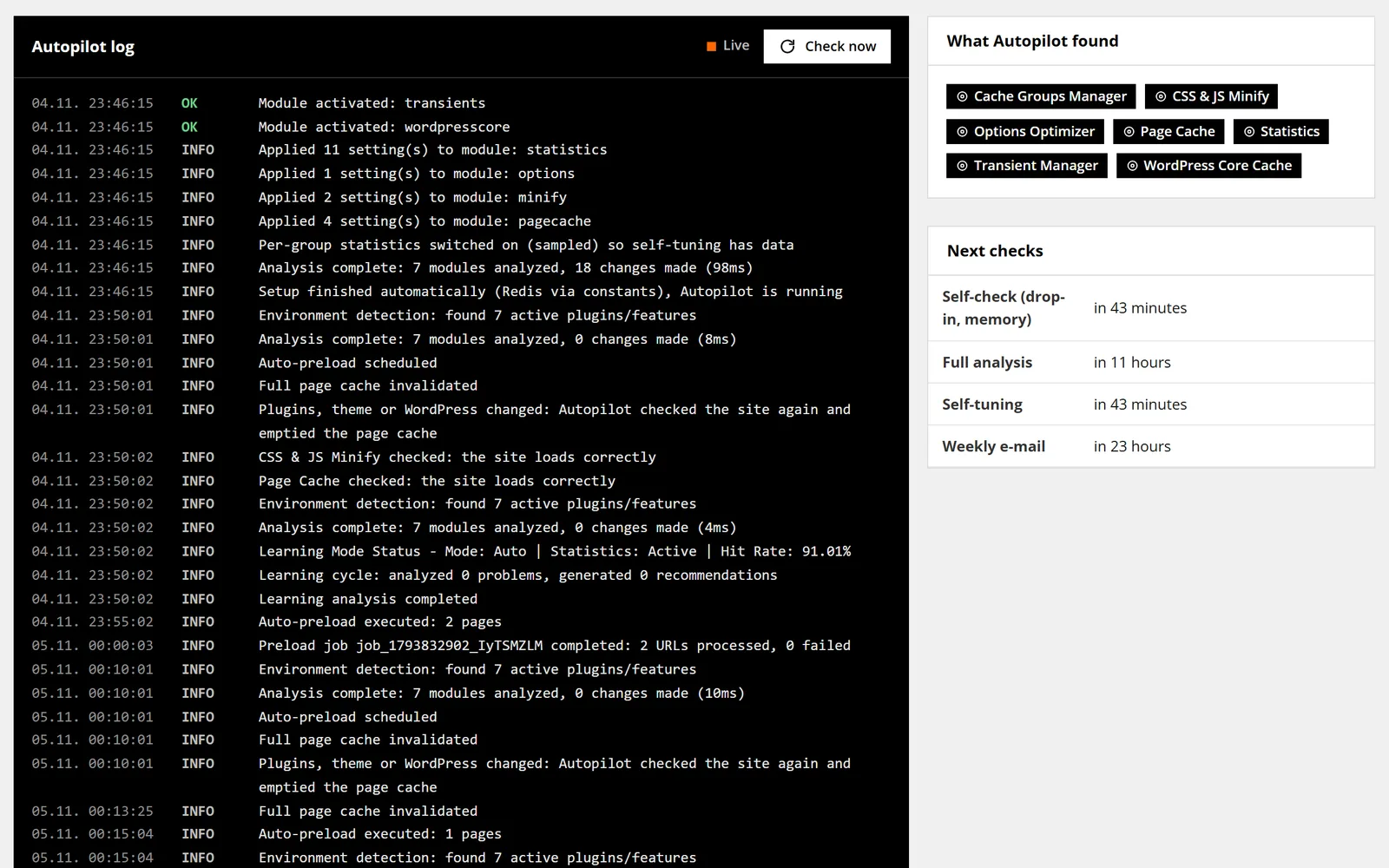
- Re-checks after changes. 30 seconds after a plugin, theme or WordPress update, Autopilot analyses the site again and empties the page cache.
- Repairs itself. An hourly check replaces a missing, foreign or outdated drop-in and warns when Redis memory is full.
- Checks what it switched on. After Autopilot enables Page Cache or Minify, a safety check loads the front page and the newest post, uncached and cached, and requests their stylesheets and scripts. If a page or an asset breaks, the module is switched off again and the log says why. Temporary errors such as 503 do not count.
- Respects manual choices. A module you switch off stays off, and changed module settings are no longer overwritten.
- Tunes from real data. Per-group statistics from 1 in 50 requests feed the self-tuning. It never raises lifetimes of price, cart, session, user or coupon data.
The Autopilot page explains the rules in detail and compares Autopilot with Expert mode.
What does the weekly report contain?
The weekly e-mail is sent only when Autopilot changed something or a problem needs attention. A week without changes produces no mail. On Multisite one report covers the whole network.
What else changed?
- A new admin with its own CachePilot menu, an overview page, an Autopilot page with a live log and one design system. Fonts are bundled, nothing loads from other hosts.
- The Statistics page needs about 50 Redis commands for its 7-day view instead of about 16,000 and now shows page cache and minify figures.
- After a failed connection the drop-in skips Redis for 30 seconds, so an outage no longer slows down every page. Timeouts are 1 second for connecting and 2 seconds for reading.
- CachePilot loads nothing on the front end of the site; the admin bar menu appears in the admin only.
- Multisite: settings apply to the whole network, emptying the cache of one site leaves the others alone.
- WooCommerce: the page cache purges product pages on price changes from the API, REST, WP-CLI, imports and scheduled sales, and keeps pages at most 12 hours so nonces stay valid.
- The Options Optimizer also covers options that WordPress 6.6 and later autoload with “auto”.
- A German translation in two forms of address, du and Sie.
The release fixes a list of bugs, among them a network flush on Multisite that never ran, a transient cleanup that never ran and keys left in Redis after uninstalling. The changelog lists every entry.
How do I update?
Settings now live under CachePilot, Settings in the new menu. After the update, check the state from the command line:
wp cachepilot status
wp cachepilot testCachePilot 1.4.1 is available to beta testers. Join the beta to download it.
Sources
- plugin/readme.txt, changelog 1.4.1 and upgrade notice 1.4.1.
- Commit 46829a1 “Version 1.4.1, Redesign und Autopilot ohne Zutun”, 4 November 2026.
- plugin/src/Autopilot/Setup.php: order of connection candidates and detection of a shared Redis database.
- plugin/src/Autopilot/Activation/SafetyCheck.php: pages and assets checked, temporary statuses 429, 502, 503 and 504.